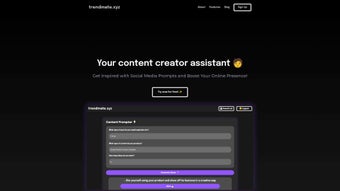

Download Trendmate – AI Writing Assistant for Content Creators
Why Trendmate Is the Go‑To AI Writing Assistant for Modern Creators
In a world where fresh, engaging content is the lifeblood of brands, influencers, and marketers, the pressure to constantly brainstorm new ideas can feel overwhelming. Trendmate steps in as a powerful, AI‑driven web application that transforms the ideation process from a time‑consuming grind into a swift, enjoyable experience. Built specifically for content creators, the platform blends machine learning with a clean, dark‑mode interface to deliver tailored content prompts in seconds.
Whether you’re planning a YouTube series, drafting a blog post, or shaping a social‑media campaign, Trendmate lets you input simple parameters—such as content type, industry niche, and desired output volume—and instantly receives a curated list of ideas that match your brief. The tool’s “saves” gallery lets you bookmark your favorite prompts, creating a personal idea vault that you can revisit anytime, across any device. Its responsive design ensures a seamless experience on Windows, macOS, Android, and iOS, while the low‑glare dark theme reduces eye strain during those marathon brainstorming sessions.
In short, Trendmate offers a secure, free‑to‑try environment that keeps you ahead of trends, boosts productivity, and lets you focus on what you do best: creating compelling content.
Overview & Core Features
Trendmate is an AI‑powered web application designed to help content creators, influencers, and marketers generate fresh content ideas with minimal effort. By leveraging natural language processing, the platform interprets user inputs—such as target audience, industry, and content format—to produce a list of relevant prompts that can be instantly used for blog posts, video scripts, podcasts, and social media updates. The intuitive dashboard, dark‑mode interface, and cross‑device compatibility make Trendmate a reliable companion for creators who need fast, reliable inspiration without sacrificing visual comfort.
Key Features
- AI‑Generated Content Prompts: Input simple criteria and receive dozens of tailored ideas within seconds.
- Save & Organize: The “saves” gallery lets you bookmark favorite prompts for future reference, creating a personal idea library.
- Responsive Design: Works flawlessly on desktop browsers, tablets, and smartphones, ensuring you can brainstorm anywhere.
- Dark‑Mode UI: Reduces screen glare for comfortable, long‑duration use, especially during late‑night sessions.
- Multi‑Industry Support: From tech startups to fashion brands, Trendmate adapts its suggestions to any niche.
- Secure Cloud Storage: Your saved ideas are encrypted and synced across devices, guaranteeing privacy and accessibility.
- Free Tier with Optional Upgrades: Get started at no cost, with premium plans that unlock higher generation limits and priority support.
Installation, Usage & Compatibility
Getting started with Trendmate is straightforward. Visit the official website, click the “Sign Up” button, and create a free account using your email or social login. Because Trendmate is a web‑based tool, there’s no need for a traditional download; you simply access it via any modern browser. Once logged in, you’ll be greeted by a clean dashboard where you can select the content type (e.g., blog post, video script, Instagram caption), specify the industry, and set the desired number of ideas. After hitting “Generate,” the AI engine churns out a list of prompts that you can instantly copy, edit, or save to your personal gallery.
For users who prefer a native feel, Trendmate also offers progressive web app (PWA) support. By clicking “Add to Home Screen” on your mobile browser, you can install a shortcut that behaves like a standalone app, complete with offline caching for previously generated ideas.
Compatibility: Trendmate runs on all major operating systems, including Windows 10/11, macOS Monterey and later, Android 8.0+, and iOS 13+. The responsive design ensures that the interface scales gracefully from a 13‑inch laptop screen to a 6‑inch smartphone display.
Pros & Cons
- Pros
- Instant AI‑driven idea generation saves hours of research.
- Free tier provides ample functionality for beginners.
- Dark‑mode UI reduces eye fatigue during long sessions.
- Cross‑platform accessibility ensures you can brainstorm anywhere.
- Secure cloud sync keeps your saved prompts safe and reachable.
- Cons
- Premium features (higher generation limits) require a paid subscription.
- Internet connection is required for real‑time AI processing.
- Customization of prompts beyond basic parameters is limited in the free version.
Trendmate delivers a fast, reliable way to generate content ideas that feel personalized and ready to use. Its dark design and cross‑device compatibility make it a comfortable daily tool for creators who need a constant stream of inspiration. While the free version is generous, power users may find the premium tier worthwhile for higher volume needs.
FAQ & Final Thoughts
Is Trendmate really free to use?
Yes, Trendmate offers a free tier that allows users to generate up to 20 prompts per month. Premium plans unlock higher limits and additional features.
Do I need to install any software?
No installation is required. Trendmate runs entirely in your web browser, and you can also add it as a progressive web app for an app‑like experience.
Can I use Trendmate on mobile devices?
Absolutely. The platform is fully responsive and works on Android and iOS devices, with a dedicated PWA option for offline access to saved ideas.
How secure is my saved content?
All saved prompts are encrypted in the cloud and synced securely across devices, ensuring your ideas remain private.
What types of content can Trendmate generate ideas for?
Trendmate supports a wide range of formats, including blog articles, video scripts, podcast outlines, social media captions, email newsletters, and more.
Conclusion – Take Your Content Creation to the Next Level
Trendmate combines the power of AI with a user‑centric design, making it an indispensable ally for anyone who needs fresh, relevant content ideas on a regular basis. Its free tier provides ample functionality for newcomers, while the premium upgrade scales with the needs of agencies and heavy‑volume creators. By simplifying brainstorming, safeguarding your ideas, and delivering a comfortable dark‑mode workspace, Trendmate helps you focus on the creative part of your workflow instead of the repetitive task of idea generation. Ready to supercharge your content pipeline? Download Trendmate today and start turning concepts into compelling stories.



.png)



